


Web Design & SEO Agency in Toronto: Building Search-First, High-Converting Digital Assets

This launch day is illustrative, not a client’s story. A Mississauga manufacturer goes live with a new website on a Tuesday. Leadership loves it, and someone orders lunch.
Three weeks later, the marketing lead opens Search Console and watches the line slope down. The old service pages that brought in most quote requests now return 404 errors. The designer never saw a redirect list, and the SEO vendor got the staging link the day before launch. Each vendor did its own job well. Nobody owned the result, which is why more companies now look for one agency that handles design and search together.
This guide covers where rebuilds go wrong, what to build first, the technical and Canadian requirements, the launch, and who to compare. If you have five pages and no search traffic worth protecting, you can stop here and hire a good designer.
The Redesign Risk: Why Website Rebuilds Lose Organic Traffic
The Mississauga graph has plenty of company, though the numbers passed around online need some care. Most of the damage traces back to a small set of causes, and none of them is bad design in the visual sense. Here’s what the data shows, the two failures behind most losses, and the fix.
What the Migration Data Actually Shows
The strongest public data comes from domain moves, the riskiest kind of rebuild. Search Engine Journal’s study of 892 domain migrations found the new domain took 523 days on average to match the old one’s organic traffic, and 17% still hadn’t caught up after 1,000 days.
That study covers domain changes only, so a redesign on the same domain should fare better. Google’s own site move guidance is calmer: expect ranking fluctuations while Google recrawls, and allow a few weeks for most pages of a small or medium site to move.
The Dev vs. SEO Disconnect
The first failure happens between people. Designers ship visually heavy pages, with autoplay video, oversized images, and animation libraries, that fail Google’s speed checks on a mid-range phone. The SEO team then sends a spreadsheet of fixes, and the developers decline it because the sprint is closed or the fixes would mean rebuilding a template. Neither side is wrong from where it sits. Search only becomes someone’s job after launch, the most expensive moment to start.
Broken Migration Mapping
The second failure is in the mapping. URLs change when the new structure goes in, and old pages that earned rankings and links for years either vanish or redirect to the homepage. Google recommends permanent server-side redirects when a URL changes, and treats them as a signal that the new address should replace the old one. Skip them and the backlinks pointing at your old pages lead nowhere.
Orphaned pages are the quieter problem. A page can survive the move and still lose its internal links because it no longer appears in the new menu. Google finds pages mostly by following links, so a page nobody links to gets crawled less and tends to fade. In the Mississauga story, both happened at once.
The Modern Solution: Unified Pod Execution
Both failures trace back to one cause: the people who would catch these problems don’t work together until it’s too late. The fix is to put design, front-end code, and technical SEO in one workflow, with one owner for the outcome.
In practice, that means the SEO specialist reviews wireframes, the developer sees the redirect map before building templates, and the designer knows which pages carry leads before redesigning them. Once those people share a workflow, the next question is what they should build first.
Core Elements of SEO-Driven Web Design
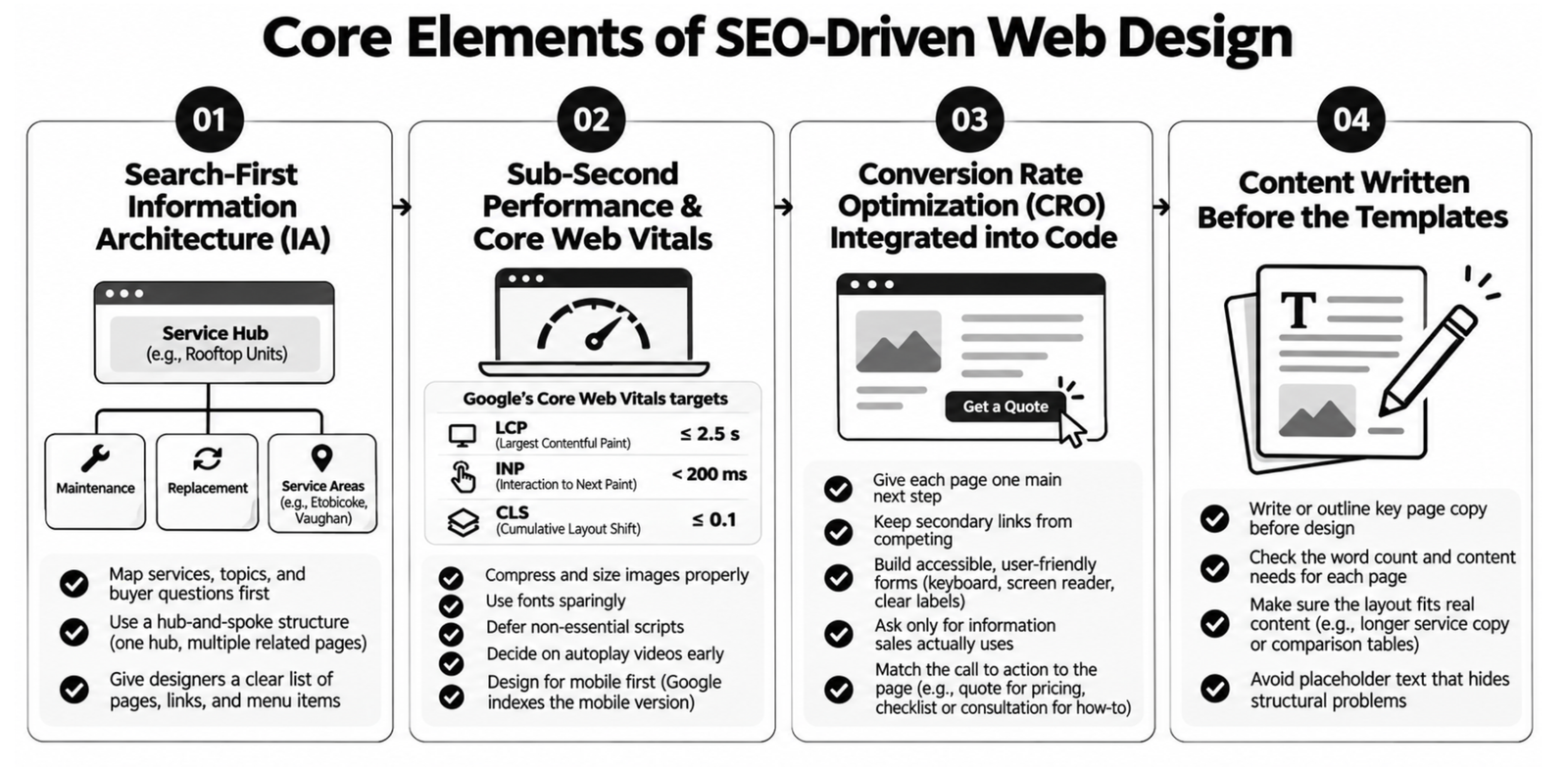
One owner only helps if that owner makes decisions in a different order. Search choices made after the wireframes are approved are expensive to undo, because every template built on the wrong structure has to be rebuilt. These four elements should be settled before anyone signs off on a homepage design.
Search-First Information Architecture (IA)
Information architecture is how your pages are grouped and linked. Map your services, topics, and buyer questions into a hub-and-spoke structure before wireframes exist: one hub page per major service, with spoke pages for each sub-service, use case, or location linking back to it.
A commercial HVAC firm serving Etobicoke and Vaughan, for example, might build a hub for rooftop units, with spokes for maintenance, replacement, and each service area. Designers then know which pages must exist, how they connect, and which ones the main menu has to surface.
Sub-Second Performance & Core Web Vitals
The heading says sub-second, and that’s a fine ambition for a lightweight page, but it isn’t Google’s bar, and no honest team promises it across a whole site. Google’s Core Web Vitals guidance sets the targets: Largest Contentful Paint (how fast the main content appears) within 2.5 seconds, Interaction to Next Paint (how quickly the page responds to a tap) under 200 milliseconds, and Cumulative Layout Shift (how much the layout jumps) under 0.1.
Good scores won’t guarantee rankings, and Google doesn’t claim they will. They do help the buyer checking your site on a phone between meetings. Lightweight loading comes down to a few habits: compress and size images for the screen, load fonts sparingly, defer scripts that aren’t needed on first view, and settle arguments about autoplay hero videos during design. Design for phones first, too. Google indexes and ranks the mobile version of your content, so the mobile layout is the one that counts.
Conversion Rate Optimization (CRO) Integrated into Code
Conversion rate optimization (CRO) means raising the share of visitors who take the action you want. When it’s built into the code instead of added later with pop-ups, every template carries a clear path. Give each page one main next step, and keep secondary links from competing with it.
Forms deserve the most care. Make them work with a keyboard and a screen reader, label every field, ask only for what sales actually uses, and show errors in plain words. Match the call to action to the page as well: a pricing page can ask for a quote, while a how-to article probably can’t, and a softer offer like a checklist or a short consultation fits better there.
Content Written Before the Templates
The last element is the one most often skipped. Write, or at least outline, the copy for your key pages before the templates are designed. Placeholder text hides real problems: a service description that needs 600 words won’t fit a layout drawn for 80, and a comparison table won’t fit a page designed around one hero image. Drafting the Mississauga team’s top service page first would have shown it was about to lose most of its text. With structure, speed, conversion paths, and content settled, the build turns to how machines read the site.
Technical & Semantic SEO Architecture for Modern Web Builds
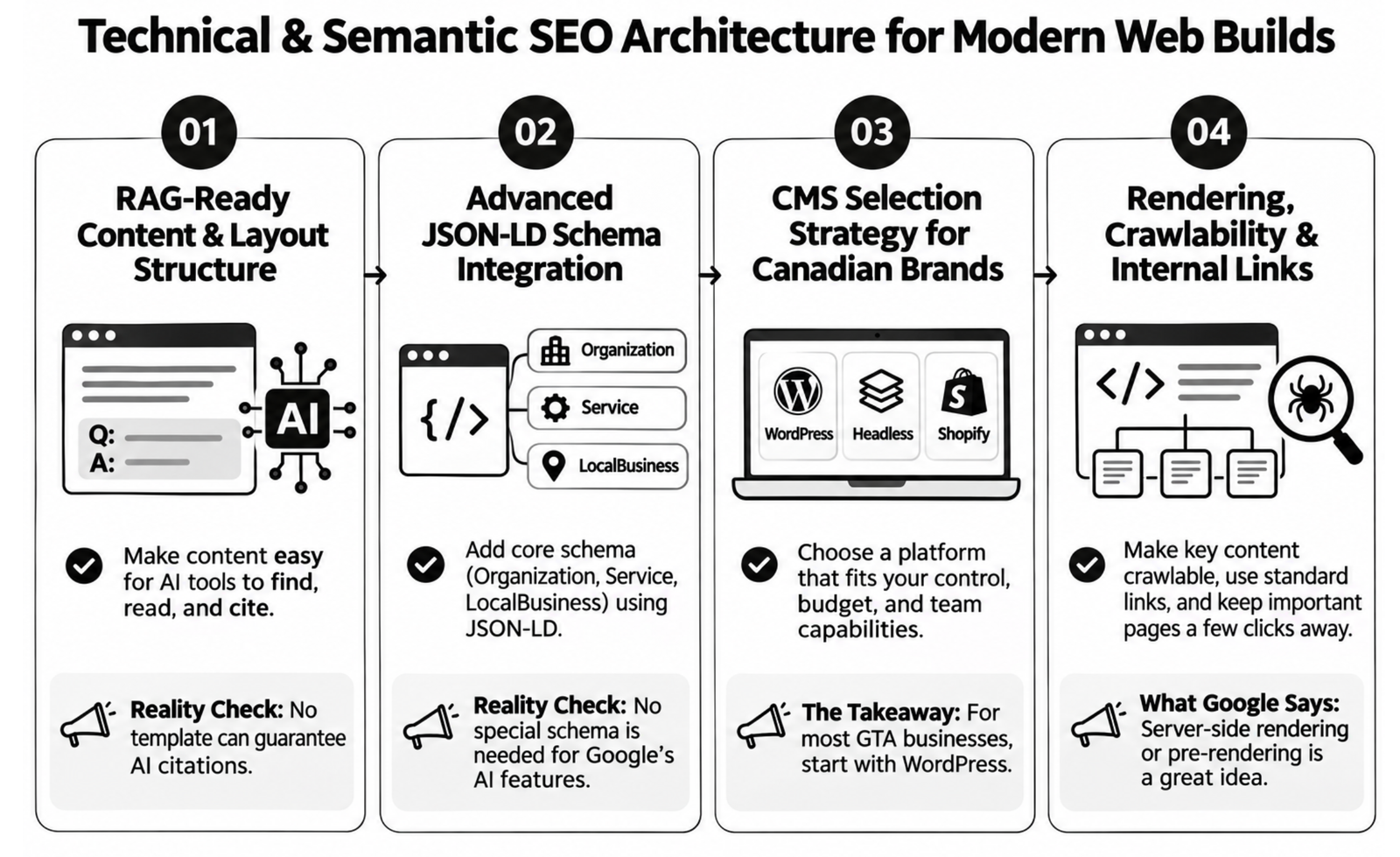
A sound structure also decides how easily machines can read the site, and those machines now include AI answer tools as well as Google’s crawler. Sales pitches get especially inflated on this topic, with promises of guaranteed AI citations. Here are the four technical decisions that matter, with what’s useful and what’s oversold in each.
RAG-Ready Content & Layout Structure
Answer engine optimization (AEO) means structuring content so AI tools can lift a clear answer from it. Generative engine optimization (GEO) means building the mentions and reputation that make those tools name your business. Tools like Perplexity, ChatGPT search, and Gemini rely on retrieval-augmented generation (RAG), where a system pulls passages from web pages before writing its reply. Our explainer on how RAG works covers the mechanics.
“RAG-ready” is a sales phrase more than a standard, so be wary of anyone selling a template as a route to guaranteed citations. What you can do is make facts easy to find and lift: one topic per section, descriptive headings that say what the section answers, a direct answer in the first sentence or two, and prices, locations, and service details in plain text instead of images or tabs.
Advanced JSON-LD Schema Integration
Schema markup is code that labels your business details for search engines, and JSON-LD is the format Google recommends for it. Build Organization, WebSite, Service, and local business markup into the templates, so every new page inherits it, and keep it matched to the visible text on the page.
Two corrections to common advice. First, Google says no special schema is needed for its AI features, as we cover in our guide to ranking in AI Overviews in Canada. Markup keeps your facts consistent; it doesn’t buy placement. Second, FAQPage markup no longer produces FAQ rich results in Google Search, which Google deprecated in May 2026. An FAQ section can still help readers, but don’t pay for it on the promise of extra space in search results.
CMS Selection Strategy for Canadian Brands
Platform choice shapes how much control your marketing team keeps after launch. Custom WordPress builds give you control over templates, redirects, and content without paying developers for every edit. Headless builds, where the content system and the front end are separate, offer speed and design freedom, but they usually cost more and leave marketers waiting on engineers for changes.
Shopify suits direct-to-consumer brands, though it locks URL prefixes like /products/ and /collections/, so you can’t fully design your own URL structure. For most GTA service businesses, we’d start with WordPress, because headless tends to solve a problem they don’t have yet. Whatever you choose, confirm before signing that your team can edit redirects, titles, and schema without a developer ticket.
Rendering, Crawlability, and Internal Links
The last technical decision is how pages are built in the browser. Google processes JavaScript sites in three phases: crawling, rendering, and indexing, and rendering waits until Google’s resources allow. Google still calls server-side rendering or pre-rendering “a great idea because it makes your website faster for users and crawlers,” and adds that “not all bots can run JavaScript.”
So make sure the main content and links are in the HTML the server sends, not only in what a script draws later. Use standard links, and keep important pages a few clicks from the homepage. This is where the orphaned pages from the Mississauga rebuild would have been caught. Machines reading your site cleanly matters most when the facts they read are accurate for Canadian buyers, which brings up the rules below.
Canadian Compliance, Hosting & Regional Optimization
Canadian law and Canadian buyers shape several build decisions, and templates imported from elsewhere often miss them. Here are the four areas to raise before the contract is signed. Run the specifics past your own counsel, since this isn’t legal advice.
PIPEDA Compliance & Data Sovereignty
PIPEDA, the federal private-sector privacy law, doesn’t require you to host in Canada, so “data sovereignty” isn’t a PIPEDA requirement. The Office of the Privacy Commissioner’s cross-border guidelines say “PIPEDA does not prohibit organizations in Canada from transferring personal information” abroad for processing. You stay accountable for it, though, and you should tell people plainly that their information may be processed in a foreign country. Quebec and Alberta have their own rules on top of this, and some public sector and regulated buyers write residency terms into their contracts.
What PIPEDA does shape is how your forms work. Its fair information principles say “the collection of personal information must be limited to that which is needed,” and that it “must be protected by appropriate security relative to the sensitivity of the information.” For a website, that means short forms, HTTPS everywhere, spam protection, a clear privacy notice near the submit button, and a known answer to where form data and CRM records actually go.
Canada-Specific Geo-Targeting & Multi-Region Setup
Use hreflang tags, which tell Google which language or region a page is for, only when you truly have separate versions, such as Canadian English, Canadian French, and US pages. Each version should point to the others. If you only serve Canada in English, you don’t need hreflang at all.
Show prices in CAD and say so, since Canadian buyers who see a bare dollar sign often assume US pricing. Then build local content only for places you serve. A firm with crews in Mississauga, Brampton, and Vaughan can write a strong page for each. Twenty thin city pages for places you’ve never worked will do more harm than good.
Accessibility Standards (AODA Compliance in Ontario)
Accessibility is often overstated in agency pitches. Ontario’s AODA web requirement applies to designated public sector organizations and to businesses and non-profits with 50 or more employees. They must meet WCAG 2.0 Level AA, with exceptions for live captions and pre-recorded audio descriptions. It’s Ontario law, not a national one, and smaller firms fall outside it, so the brief’s claim that WCAG 2.1 AA is required of Canadian businesses isn’t accurate.
Building to WCAG 2.1 AA anyway is good practice, and it’s cheaper to do during the build than to retrofit. In components, that means enough colour contrast, visible focus states, alt text on meaningful images, form fields with labels, and menus that work with a keyboard.
Analytics, Cookies, and Consent
Tracking tags collect personal information too, so they belong in this conversation. If you have visitors in Quebec, its private-sector privacy law, as amended by Law 25, requires technology that can identify, locate, or profile a person to be off unless the person turns it on. Lawyers are still debating how that applies to cookies, but the common reading is that non-essential tracking cookies should be off by default.
For the build, that means a consent tool that actually blocks tags until consent is given, a tag inventory so you know what each script collects, and analytics set up to keep working in a consent-aware mode. Adding a consent banner after launch often breaks conversion tracking quietly. All of this has to survive launch day.
Pre-Launch, Migration & Post-Launch SEO Playbook
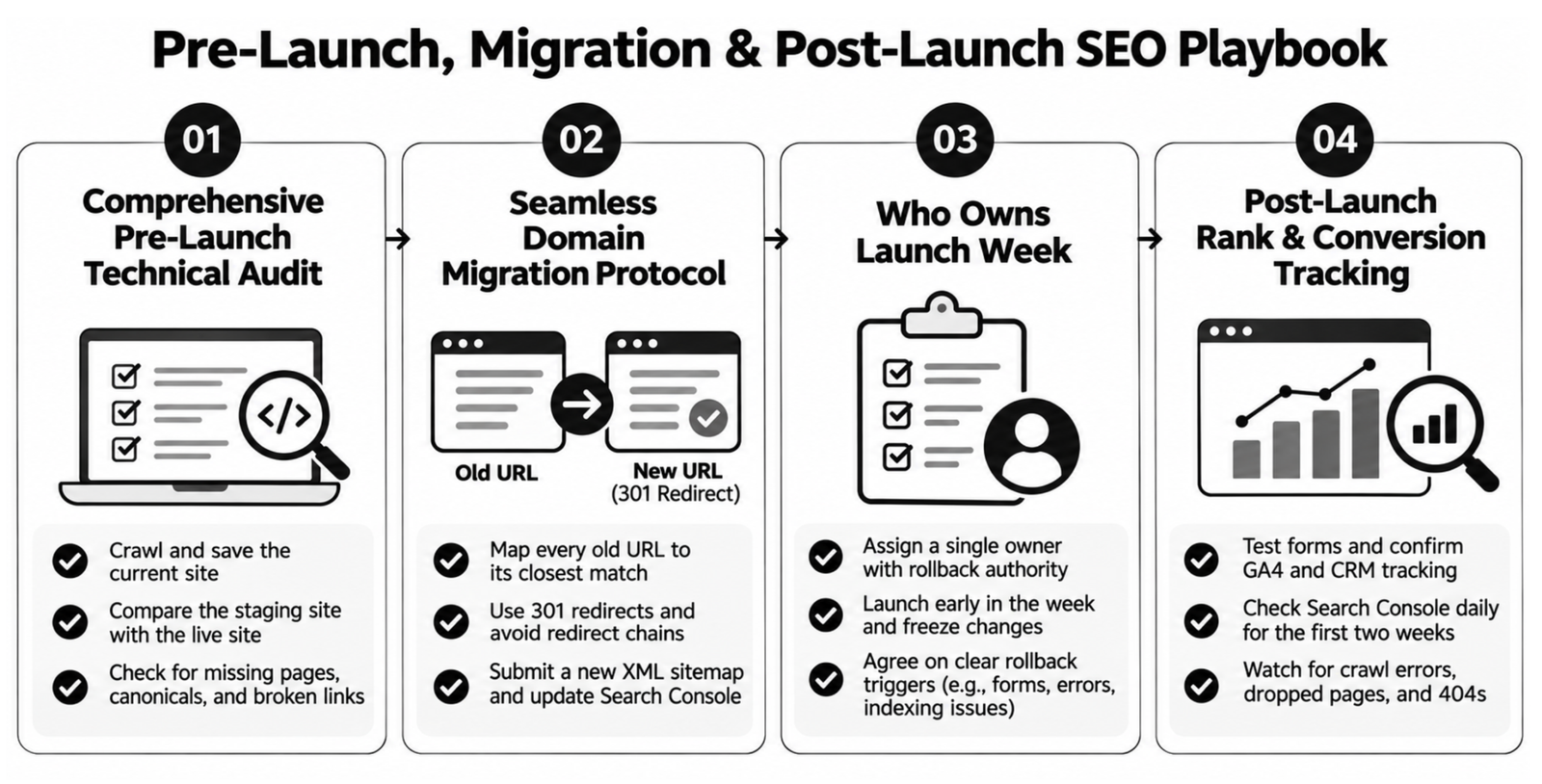
Back to that Tuesday in Mississauga. A checklist and a named owner would have caught nearly everything that went wrong. Launch splits into four jobs, in this order, and the first starts weeks before go-live.
Comprehensive Pre-Launch Technical Audit
Start with a full crawl of the current live site and save it. That’s your record of every URL, title, and internal link before anything changes. Pull your top pages by organic traffic, conversions, and backlinks from Search Console, analytics, and a backlink tool, because those are the pages you can’t afford to lose.
Then block the staging site from indexing, crawl it, and compare the results with the live crawl. Look for missing pages, wrong canonical tags, broken internal links, and titles reset to defaults. Finally, confirm the indexing block comes off at launch, because a leftover noindex tag can do more damage than any design decision.
Seamless Domain Migration Protocol
A migration goes smoothly only when every old URL has somewhere to go. Google’s guidance is direct: “It’s important to map your old site’s URLs to the URLs for the new site.” Use 301 redirects, send each old page to its closest match instead of the homepage, and start with the pages that earn links and leads. Avoid redirect chains.
Google says to keep redirects “generally at least 1 year,” so write that into the handover. On launch day, submit the new XML sitemap in Google Search Console. If the domain or subdomain changes, verify both properties and file a Change of Address for the old site. Then check your top commercial pages by hand, instead of waiting for a report to surface a problem.
Who Owns Launch Week
Every item above needs a name next to it. Name one person who can approve a rollback. Launch early in the week, and freeze content changes for a few days. Agree in advance on what justifies a rollback: forms failing, key pages returning errors, or the site blocked from indexing. In the Mississauga story, nobody owned launch week, so nobody looked until the traffic had gone.
Post-Launch Rank & Conversion Tracking
Test every form on launch day, and confirm that GA4 conversions and CRM attribution survived the move. Check Search Console daily for the first two weeks, comparing impressions and clicks on the pages that mattered before. Search Console reports impressions, not impression share, which is a paid search metric, so compare page by page against your pre-launch baseline.
Watch for crawl errors, dropped pages, and redirects that land on 404s. A traffic line can recover while leads stay flat, which is why we’d rather report on pipeline and share of voice than on visits alone. The playbook holds on every platform, though the risky pages differ.
Multi-Channel Web Integration (Shopify, HubSpot & Custom Stacks)
The launch steps hold on every platform, but an online store and a B2B services firm break in very different places. Here’s what to check for the four setups we see most often.
eCommerce Web Design & SEO
For direct-to-consumer brands on Shopify or WooCommerce, category pages usually carry the commercial searches, so protect their URLs and copy during a redesign.
Product pages should carry Product structured data, which Google still supports for product snippets and merchant listings, showing price, stock, and review details where eligible. Filters need rules too. Every colour, size, and price combination can spawn another URL for Google to waste time crawling, so decide which filtered pages deserve to be indexed (a popular “men’s waterproof boots” view, say) and keep the rest out.
B2B Enterprise & SaaS Web Builds
B2B and SaaS builds carry a different risk: complex service pages, case study hubs, and demo request flows. Service templates should hold long explanations, comparison tables, and proof, because buying committees read more than consumers do. Case study filters should produce crawlable pages, and demo request flows should be short and route leads correctly. Test the form-to-CRM path as carefully as the redirects, since a broken integration loses leads without changing any ranking.
HubSpot CMS and CRM-Connected Sites
If your site runs on HubSpot’s content tools, or connects its forms to HubSpot’s CRM, the integration is the fragile part. HubSpot has a built-in URL redirects tool that accepts bulk uploads by CSV, so your redirect map can go in at once rather than page by page.
Before launch, map every old form to its new version so lead sources, lifecycle stages, and workflows keep firing. A rebuild that changes form IDs can quietly break months of reporting.
Custom and Headless Stacks
Custom and headless builds give you the most freedom and the most ways to go wrong. Agree on who manages redirects, since they may live in the hosting layer, the front-end framework, or a CDN, and each needs a different person to change them. Confirm that pages are rendered server-side, that titles and schema can be edited without a deployment, and that staging mirrors production. With the platform questions clear, you can compare the firms on your list.
Top 5 Web Design & SEO Agencies in Canada (2026 Market Analysis)
Every agency on a shortlist will say it does design and search together. The useful question is how, and who would have caught the Mississauga redirect problem before launch. Here’s how this list was built, five firms worth comparing, the warning signs, and the questions to ask each one.
How This List Was Put Together
Gowishy wrote this list, and Gowishy is on it, so read it knowing that. It isn’t a ranking, and the order means nothing. The other four firms are described from their own websites or, where noted, a directory listing.
Agency Model Breakdown
These five firms combine web design and development with search work in different ways and for different kinds of clients.
Gowishy
A Toronto agency where design, code, and search share one pod and one monthly fee, alongside AEO and GEO, content, and product marketing. Judge the model by how it handles your redirect map.
Azuro Digital
A Canadian web agency with offices in Ottawa, Toronto, and Calgary. It offers custom website design, WordPress development, SEO, and AI search optimization, along with accessibility and privacy compliance work. Its site points to particular experience in healthcare and industrial web design.
Ignite Digital
A digital marketing agency headquartered in Mississauga, according to its DesignRush listing, with further offices in Houston and Clearwater. Listed services include SEO, paid search, website design and development, and social media management, with WordPress and Shopify experience. Small and medium businesses are its stated client types.
Envy Design Co.
A branding, web design, and development agency working from Ontario, with Toronto among its listed service areas. It covers brand identity, WordPress and e-commerce builds, and UX and UI design, alongside SEO and strategy.
BlueHat Marketing
A digital marketing agency operating since 2005, with Canadian offices in Montréal and Toronto. It builds service and e-commerce websites, including bilingual ones, and offers local, national, and e-commerce SEO, plus AI visibility audits. The bilingual work matters if you sell into Quebec.
Red Flags When Hiring a Dual-Service Agency
Whichever firm you call, watch for three warning signs. The first is development outsourced without saying so, which recreates the handoff problem inside a single contract. The second is SEO priced as a post-launch add-on, which means nobody is checking the structure while it’s still cheap to change.
The third is a portfolio of slow, bloated templates. Run a few of their recent client sites through Google’s PageSpeed Insights on mobile before the first call. A good firm will show you who does the work, and we’d like to be judged the same way.
Questions to Ask Every Agency on This List
Put the same questions to each firm, in writing:
- Who builds the redirect map, and when do they start?
- Will the SEO specialist review wireframes before design is approved?
- Who writes the code, and are they employees or contractors?
- Who monitors Search Console and the forms for the first two weeks after go-live?
- Can my team edit titles, redirects, and schema after launch without a ticket?
Vague answers to the first and last questions tell you the most. Those are the gaps the Mississauga team fell into, and they’re the gaps our own model was built around.
The Gowishy Advantage: Unified Execution Pods
Every failure in this guide happened in a gap between vendors or between roles. We built Gowishy to take that gap away. Here’s how the pod works in practice, and what we measure.
Zero Hand-Off Bottlenecks
Our web design and SEO service in Toronto puts the designer, the developer, and the SEO specialist on the same team from the first workshop. The people drawing the page and writing its code sit with the person who owns the redirect map, so the staging link doesn’t show up the day before launch. Search problems get raised in a wireframe review, when fixing them costs a comment, not in a post-launch audit, when they cost a sprint.
One Plan, Six Roles
The pod covers six roles: a Web Designer, a Web Developer, an SEO Specialist, an AEO and GEO Strategist, a Content Strategist & Writer, and a Product Marketing Strategist. All six sit on one plan, for one monthly investment. You’re not hiring six disconnected people. The content strategist drafts key pages before templates exist, and the product marketing strategist makes sure the pages say what sets you apart.
A Process That Starts With the Business
The work moves through five steps: Understand, Position, Map demand, Build, and Grow. We do not start with keywords. We start with the business, so nobody opens a wireframe before the services, buyers, and margins are clear.
Map demand is where the search-first information architecture comes from, and Build is where the redirect map, templates, and launch plan come together.
Business-Outcome Driven Design
We measure a build by qualified pipeline, organic conversion rate, and revenue, not by design awards. We can’t promise a rankings outcome any more than anyone else can, and you should be wary of anyone who does.
That Mississauga team found out what the launch cost three weeks after the lunch. If your rebuild is still on the whiteboard, you can find out first. Talk to us at Gowishy.
Frequently Asked Questions
How Do I Choose a Web Design and SEO Agency in Toronto?
A search for “web design and SEO agency Toronto” returns design studios and SEO firms alike, so test them the same way. Ask who owns the redirect map, who reviews wireframes for search, and who watches the site for two weeks after launch. A strong agency will name a person for each. Then check two or three of their recent builds on a phone and in PageSpeed Insights before you sign.
When Should the SEO Work on a Redesign Begin?
Before wireframes, and ideally before you pick a vendor. In a website redesign SEO strategy, GTA teams most often get the timing wrong. Your existing rankings, backlinks, and top lead pages should shape the new structure. Waiting until staging means search problems get fixed in finished templates, which costs more and usually gets cut.
Will I Lose Traffic During a Website Redesign?
Some fluctuation is normal, and Google says to expect it while it recrawls your site. Lasting losses usually come from fixable problems: missing redirects, deleted pages, or changed content on pages that used to rank. A careful URL map, and a team that watches the numbers after launch, shrinks the risk considerably.
Does My Website Have to Meet AODA Standards?
If you’re an Ontario business or non-profit with 50 or more employees, or a designated public sector organization, the web requirement applies, and the standard is WCAG 2.0 Level AA with limited exceptions. Smaller firms and those outside Ontario aren’t covered by this rule. Check with counsel, since other laws can still apply.
Should Custom WordPress Dev and SEO Be Handled by One Team?
Usually, yes. Custom WordPress dev and SEO decisions overlap on templates, page speed, redirects, schema, and internal links. When separate vendors handle them, each change needs a handoff and someone to settle disagreements. One team can make those calls during the build, when they’re cheapest to get right.
How Much Does a Website Rebuild With SEO Cost?
Quotes from any SEO web design agency, Canada-based or not, depend on page count, integrations, content work, and how much search history needs protecting, so a headline number tells you little. Ask each firm for written deliverables in CAD, including who builds the redirect map and who monitors the launch.
Related articles
-
Healthcare SEO Agency in Toronto: Compliant Patient Acquisition & Local Search Dominance
“Physicians must not advertise in a manner which … contains any statement that promises or suggests a better or more effective service than any other physician or health professional.” That line comes from the College of Physicians and Surgeons of Ontario’s Advertising policy, and it rules out a lot of what SEO agencies write by…
-
B2B SEO Agency in Toronto: Turning Organic Search into Qualified Sales Pipeline
Thirteen internal stakeholders and nine external influencers. That’s who shapes a typical B2B purchase, according to Forrester’s State of Business Buying 2026, and the count climbs for complex deals. That’s twenty-two people. Your monthly SEO report still leads with blog sessions. Marketing leaders start looking for a B2B SEO agency in Toronto the moment that…
-
How to Audit Your Website for AI Search Readiness: The Complete Checklist
On February 26, 2015, Google gave website owners a deadline. Starting April 21, it would expand its use of mobile-friendliness as a ranking signal, a change it said “will have a significant impact in our search results.” The industry nicknamed it Mobilegeddon. Businesses had about eight weeks, a free Mobile-Friendly Test, and a clear pass…