


How to Audit Your Website for AI Search Readiness: The Complete Checklist

On February 26, 2015, Google gave website owners a deadline. Starting April 21, it would expand its use of mobile-friendliness as a ranking signal, a change it said “will have a significant impact in our search results.” The industry nicknamed it Mobilegeddon. Businesses had about eight weeks, a free Mobile-Friendly Test, and a clear pass or fail.
The shift to AI search is the same kind of change with none of that help: no date, no single test, and no one engine to satisfy. Google’s AI Overviews, ChatGPT search, Perplexity, and Claude each read your site differently, and some may already be locked out by a setting nobody remembers choosing.
An AI search readiness audit closes that gap. It’s a website-level check of whether AI systems can reach your pages, understand who you are, pull clean answers from your content, and find others vouching for you. This checklist walks through all four, in the order problems usually surface.
What an AI Search Readiness Audit Covers
Before the checklist, it’s worth being clear about scope, because “AI audit” gets used for two different jobs. One asks where your brand shows up when you prompt ChatGPT or Perplexity; the other asks whether your website is built so those tools can use it. Here’s how this audit fits alongside the first.
Gowishy has already covered the prompting side in its guide to running an AI brand visibility audit. That audit tells you the outcome. This one, sometimes called an AEO website audit or a GEO audit checklist, finds the causes. Answer engine optimization (AEO) means shaping content so AI systems can lift a clear answer from it; generative engine optimization (GEO) means earning mentions and citations inside AI-generated responses.
The audit runs in four layers: crawl access, entity and schema, content extraction, and off-site reputation. Run them in that order. A brilliant FAQ page does nothing for ChatGPT search readiness if OpenAI’s search crawler is blocked at the door, and that door is where most of the surprises are.
Layer 1: Check AI Crawler Access in robots.txt
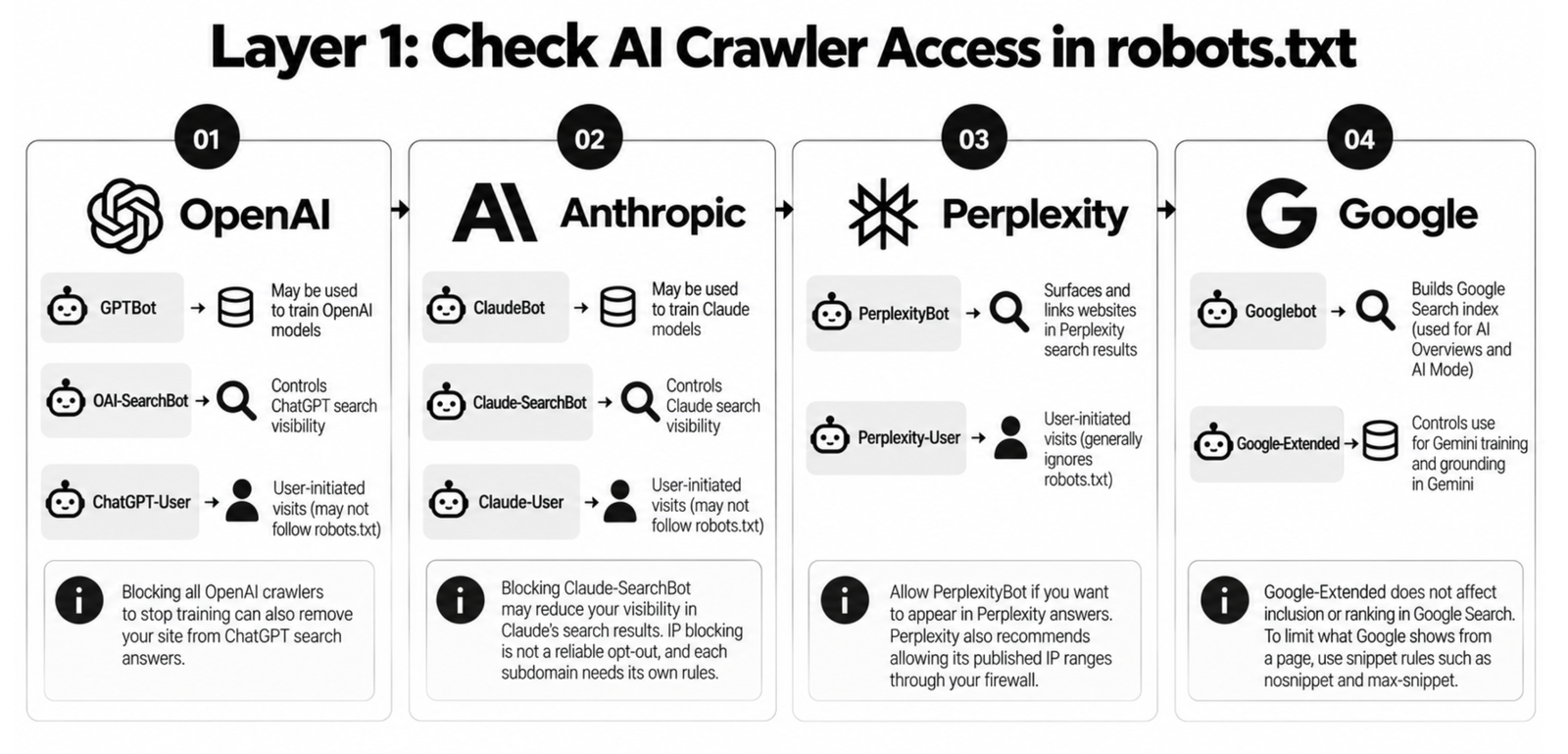
Every AI search tool sends software (a crawler, identified by a user-agent name) to read your pages, and your robots.txt file tells each one what it may access. The catch is that most AI companies now run several crawlers with different jobs, so one blanket rule can remove you from search answers when you only meant to opt out of model training. The following are the crawlers to check, vendor by vendor, with a sample file at the end.
OpenAI: GPTBot, OAI-SearchBot, and ChatGPT-User
OpenAI’s crawler documentation separates three agents. OAI-SearchBot controls whether your site appears in ChatGPT search answers. GPTBot controls whether your content may be used to train OpenAI’s foundation models. ChatGPT-User handles visits a person triggers inside ChatGPT, and OpenAI says it may not follow robots.txt rules because the request is user-initiated.
The common mistake is blocking everything from OpenAI to stop training, and losing ChatGPT search visibility you wanted. Decide on search and training separately.
Anthropic: ClaudeBot, Claude-SearchBot, and Claude-User
Anthropic uses the same split, documented in its help centre article on crawling. ClaudeBot collects content that may be used for model training. Claude-SearchBot indexes content to improve Claude’s search results, and Anthropic says blocking it may reduce your visibility in those results. Claude-User fetches pages when someone asks Claude a question.
Anthropic also notes that IP blocking isn’t a reliable opt-out and that each subdomain needs its own robots.txt rules.
Perplexity: PerplexityBot and Perplexity-User
Perplexity’s bot documentation says PerplexityBot exists to surface and link websites in Perplexity’s search results, and is not used to crawl content for training AI foundation models. Perplexity-User handles user-initiated fetches and, per Perplexity, generally ignores robots.txt.
If you want to appear in Perplexity answers, PerplexityBot has to be allowed, and Perplexity also recommends allowing its published IP ranges through your firewall.
Google: Googlebot and Google-Extended
Google works differently, and this is where audits most often go wrong. AI Overviews and AI Mode draw on Google’s regular Search index, which Googlebot builds. Google-Extended isn’t a separate crawler at all. Google’s crawler documentation describes it as a product token that controls whether your content may be used to train future Gemini models and for grounding in Gemini, and says it does not affect inclusion or ranking in Google Search.
So blocking Google-Extended won’t remove you from AI Overviews or help you get in. To limit what Google shows from a page, use snippet rules such as nosnippet and max-snippet.
What a Sensible robots.txt Looks Like?
Here’s an example for a business that wants to appear in AI search answers. It allows search and training crawlers, with a note on opting out of training. Each crawler follows only the group that names it most specifically, which is why the admin rule repeats.
# AI search crawlers: allowed
User-agent: OAI-SearchBot
User-agent: Claude-SearchBot
User-agent: PerplexityBot
Allow: /
Disallow: /wp-admin/
# Training crawlers: allowed here.
# To opt out of training, change “Allow: /” to “Disallow: /”
User-agent: GPTBot
User-agent: ClaudeBot
User-agent: Google-Extended
Allow: /
Disallow: /wp-admin/
User-agent: *
Disallow: /wp-admin/
Sitemap: https://www.example.ca/sitemap.xml
Opting out of training is a judgment call. Publishers whose content is the product often block it; a Toronto accounting firm that wants models to know it exists has less reason to.
Two checks outside robots.txt finish this layer. First, your firewall or CDN: in July 2025, Cloudflare began blocking known AI crawlers by default for new domains, so a robots.txt that says “allowed” can be overruled upstream. Second, JavaScript: a December 2024 Vercel analysis found that none of the major AI crawlers rendered JavaScript. If your services or pricing load only through client-side scripts, those crawlers may see an empty page. Once crawlers can get in, the next question is whether they can tell who you are.
Layer 2: Check Your Entity and Schema Markup
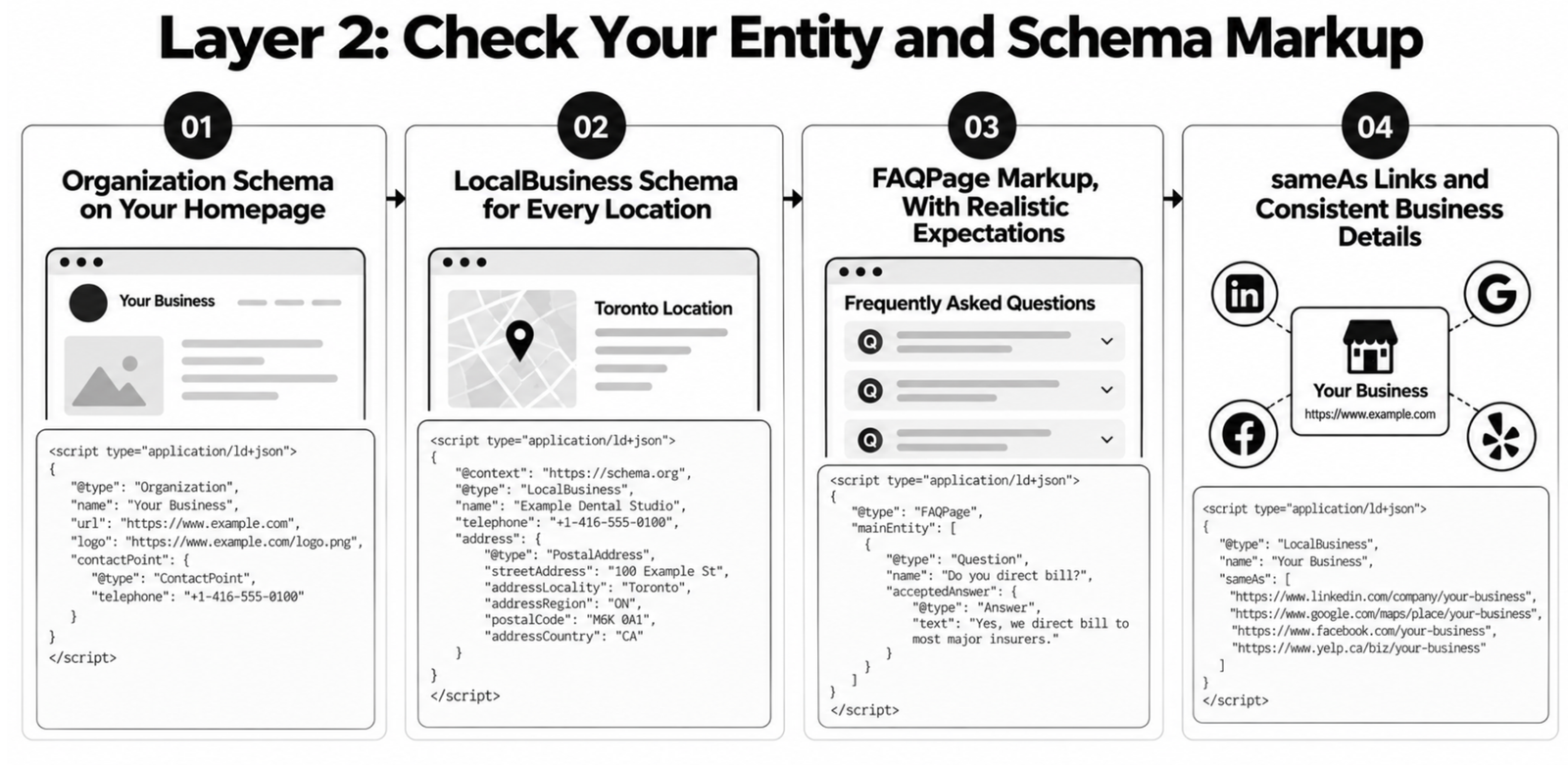
An entity is how machines understand your business as one specific thing: a name, a location, a set of services, and the profiles that belong to it. Schema markup (structured data, usually JSON-LD code in the page) labels those facts so no system has to guess. Here are the four checks that matter most.
Organization Schema on Your Homepage
Your homepage should carry Organization markup with your legal or trading name, logo, URL, and contact details. Google’s Organization structured data guide lists the supported properties. Validate it, and confirm the name matches your signage and invoices, not an old brand.
LocalBusiness Schema for Every Location
If customers visit you or you serve a defined area, add LocalBusiness markup (or a more specific subtype such as Dentist or AccountingService) to each location page. A minimal block looks like this:
{
“@context”: “https://schema.org”,
“@type”: “LocalBusiness”,
“name”: “Example Dental Studio”,
“telephone”: “+1-416-555-0100”,
“address”: {
“@type”: “PostalAddress”,
“streetAddress”: “100 Example St”,
“addressLocality”: “Toronto”,
“addressRegion”: “ON”,
“postalCode”: “M6K 0A1”,
“addressCountry”: “CA”
}
}
A bakery with shops in Liberty Village and North York needs two blocks on two pages.
FAQPage Markup, With Realistic Expectations
FAQ schema still gets recommended as an AI search shortcut. Be careful with it. Google first restricted FAQ rich results to “well-known, authoritative government and health websites” in August 2023, then stopped showing them in Search entirely on May 7, 2026. The expandable FAQ snippet is gone for everyone.
The markup is still valid schema.org vocabulary, and Google says unused structured data causes no problems. Keep it if it accurately mirrors questions visibly answered on the page. Just don’t expect it to win AI Overviews by itself; Google says structured data isn’t required for its AI features. The visible question-and-answer content is what does the work.
sameAs Links and Consistent Business Details
Add a sameAs property listing your official profiles (LinkedIn, Google Business Profile, industry directories). Then compare your name, address, and phone number across your site, your schema, and every listing. One old suite number or a 905 number where a 416 should be is enough to split your entity in two. Gowishy’s guide to schema markup for AEO covers implementation detail. With identity confirmed, the audit moves to the content itself.
Layer 3: Check Whether Your Content Can Be Extracted
AI systems answer questions by pulling specific passages from pages, so the shape of your content decides whether there’s anything clean to pull. Take your most important pages (services, pricing, top posts) and run the checks below by hand.
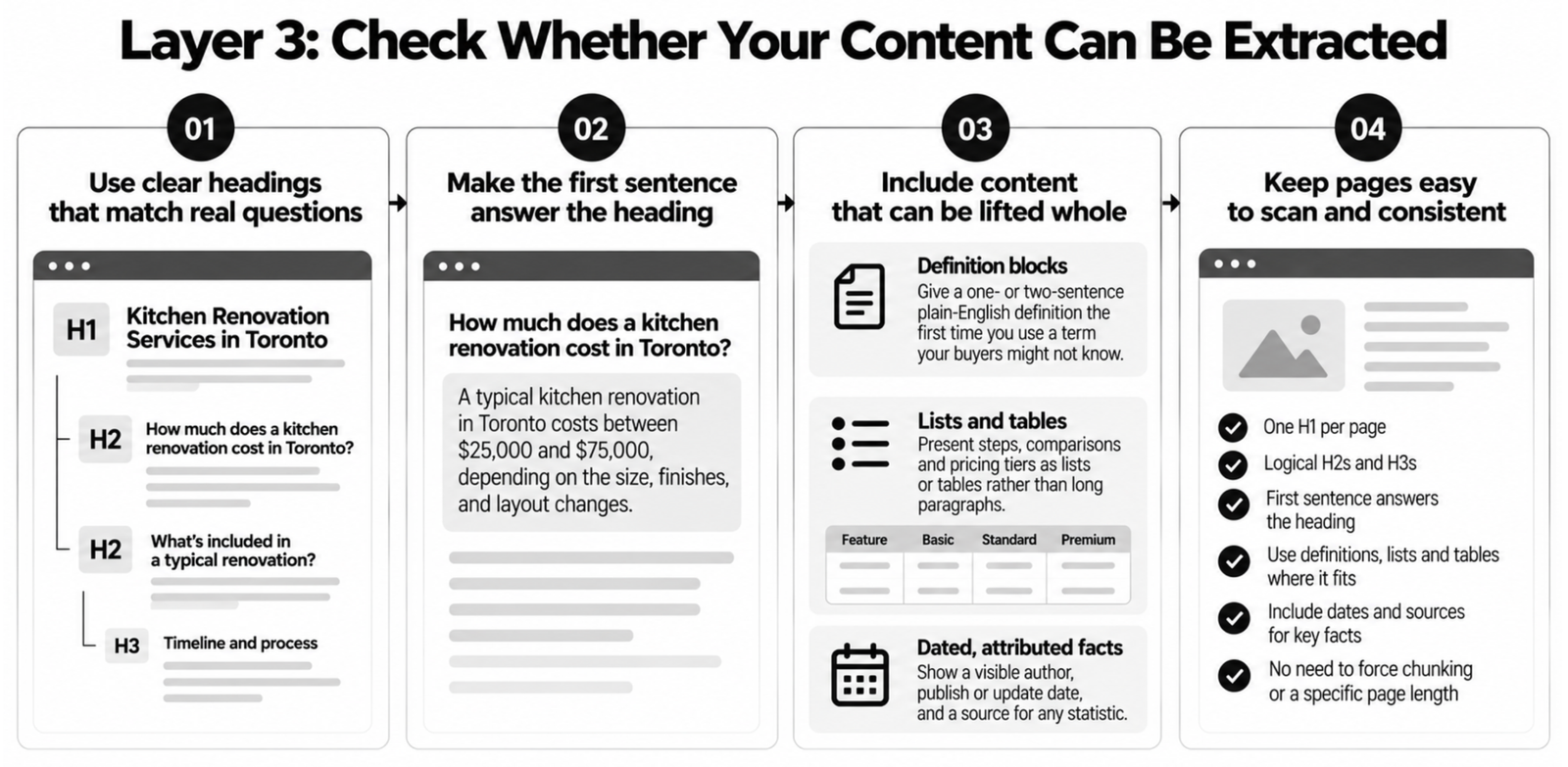
Start with headings. Each page should have one H1 and a logical run of H2s and H3s that describe what follows, ideally phrased the way buyers ask (“How much does a kitchen renovation cost in Toronto?”). Then read the first sentence under each heading. It should answer that heading directly. If it opens with background, the answer is buried.
Next, look for content a system can lift whole:
- Definition blocks: a one- or two-sentence plain-English definition the first time you use a term your buyers might not know.
- Lists and tables: steps, comparisons, and pricing tiers presented as lists or tables rather than long paragraphs.
- Dated, attributed facts: a visible author, a publish or update date, and a source for any statistic.
This doesn’t mean rewriting your site into fragments. Google’s guidance says there’s no requirement to chunk content for AI and no ideal page length. The goal is pages a busy reader can scan, which is also what a retrieval system needs. Gowishy’s comparison of GEO and traditional SEO covers what else changes. Strong pages still need outside support, though.
Layer 4: Check Brand Mentions and Sentiment Off Your Site
The last layer leaves your website, because AI answers lean on what others say about you. A tool asked for “the best physiotherapy clinic in Etobicoke” weighs reviews, listings, and forum threads alongside your own pages. Here’s how to check that outside record.
Start with your Google Business Profile: review count, recent review dates, how you respond, and whether categories and hours match your site. Then check the Canadian directories buyers and AI tools both read, such as Yelp.ca, YellowPages.ca, the Better Business Bureau, and your industry association. Look for duplicates, old addresses, and closed locations that still show as open.
Then search for unlinked mentions in local news, trade publications, and communities like r/toronto, and note the tone as well as the count. A thread where three people complain about your billing can shape an AI summary more than your homepage copy.
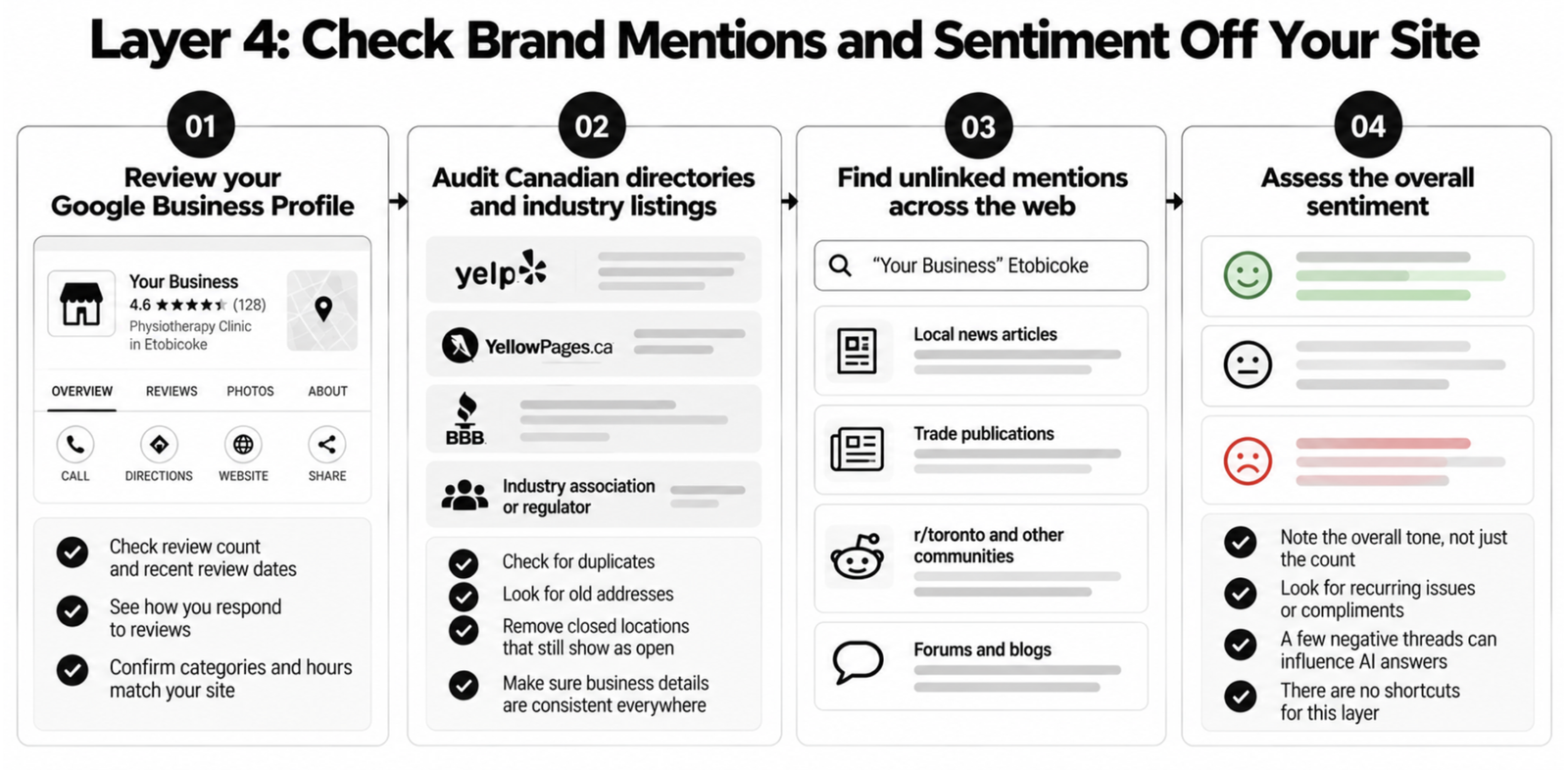
Fixing this layer takes the longest, and there are no shortcuts. Google’s AI search guide warns that seeking inauthentic mentions isn’t as helpful as it might seem. With all four layers covered, here’s the whole audit in one place.
The AI Search Readiness Audit Checklist
This table condenses the four layers into checks you can run in an afternoon, in the same order: access first, reputation last. Mark each row pass, fail, or unsure.
| Layer | Check | Pass looks like |
| Access | robots.txt rules for OAI-SearchBot, Claude-SearchBot, PerplexityBot | Allowed, unless you’ve chosen otherwise |
| Access | Training crawlers (GPTBot, ClaudeBot, Google-Extended) | A deliberate decision, written down |
| Access | CDN or firewall bot settings | AI search crawlers not blocked upstream |
| Access | Key content without JavaScript | Services and pricing visible in raw HTML |
| Entity | Organization and LocalBusiness schema | Valid, matches visible page details |
| Entity | Name, address, phone across site and listings | Identical everywhere |
| Content | Headings, first sentences, lists, dates, authors | Direct answers, scannable, attributed |
| Reputation | Google Business Profile, directories, mentions | Accurate, recent, no duplicates |
Finding the failed rows is the easy part. Fixing them in the right order, without breaking regular SEO, is where an outside team earns its fee.
How Gowishy Runs an AI Search Audit for Toronto Businesses
The checklist above will find the problems. The fixes cross several jobs: a developer for robots.txt, rendering, and schema; a strategist for the training decision; a writer for priority pages; someone to clean up listings and earn real mentions.
Gowishy’s pod covers those roles on one monthly fee, with SEO, AEO and GEO strategy, content, design, and development working from one plan. An AI search audit in Toronto with Gowishy follows the same four layers and ends with a prioritized action checklist: what to fix this week, what takes a quarter, and what to leave alone.
In 2015, Google gave businesses eight weeks and a test. This time, the deadline is whenever your buyers started asking ChatGPT instead, and for many of them that’s already happened. If you’d like a second set of eyes on your site and a summary of what to fix first, book a consultation and talk to us at Gowishy.
Frequently Asked Questions
What is an AI search readiness audit?
It’s a review of whether AI search tools can use your website. It checks whether AI crawlers can reach your pages, whether schema and listings describe your business consistently, whether your content offers clear answers, and what third-party sites say about you. A brand visibility audit, by contrast, prompts AI tools to see where you appear.
Does blocking GPTBot remove my site from ChatGPT?
No. GPTBot controls whether OpenAI may use your content for model training. Appearing in ChatGPT search answers depends on OAI-SearchBot. If you want to opt out of training but stay visible in ChatGPT search, block GPTBot and allow OAI-SearchBot in your robots.txt file.
Does Google-Extended control AI Overviews?
No. Google says Google-Extended controls whether your content may be used for Gemini model training and grounding, and that it doesn’t affect inclusion or ranking in Google Search. AI Overviews draw on the regular Search index built by Googlebot. To limit what Google shows from a page, use snippet controls such as nosnippet.
Is FAQ schema still worth adding?
It can be, with realistic expectations. Google stopped showing FAQ rich results in Search on May 7, 2026, so the markup won’t earn you a special snippet. The markup is still valid and harmless if it matches visible content, but the visible questions and answers on the page do the real work in AI search.
How often should I run an AI search readiness audit?
Run a full audit once, then recheck the access layer quarterly and after any migration, CDN change, or plugin update that touches robots.txt. AI companies add and rename crawlers, so review vendor documentation twice a year. Check listings and reviews monthly.
Related articles
-

How Much Should a Toronto Small Business Actually Spend on GEO?
Most Toronto small businesses should expect GEO quotes somewhere between $1,500 and $5,000 CAD a month, with multi-location and highly competitive businesses going past $5,000. Treat those as typical market ranges, not a price list. We haven’t seen an independent, published survey of GEO pricing in Canada, so the figures in this guide are estimates…
-
5 AI Search Optimization Tips Toronto Businesses Can’t Ignore (AEO and GEO)
An awkward admission for an agency to make: there is no secret trick to getting your business named by ChatGPT or Google’s AI Overviews. Google says so itself. Its guidance for site owners states that “there are no additional requirements to appear in AI Overviews or AI Mode, nor other special optimizations necessary” (Google Search…
-

How to Master AEO and GEO for Small Business in Toronto: A Success Guide
The story in this guide is hypothetical. The clinic is invented, and so is everything that happens to it. Every step it takes, though, is a real part of AEO for small business in Toronto, and one you can start this month. Picture a two-location physiotherapy clinic, one on Queen Street East in Leslieville and…